

The GeM Seller Dashboard Overview is the backbone of the Government e-Marketplace (GeM), India’s official procurement platform for ministries, PSUs, and state bodies. Launched in 2016, GeM has simplified buying and selling for both sellers and service providers, ensuring transparency, efficiency, and inclusiveness in public procurement.
If you are planning to register as a seller or a service provider on GeM, this GeM Seller Dashboard Overview 2025 will guide you step by step — from registration to payments.
Table of Contents
Why the GeM Seller Dashboard Matters
Before GeM, procurement was complex: multiple portals, manual paperwork, compliance gaps, and very limited participation from MSMEs.
The GeM Seller Dashboard 2025 solves this with:
- Standardized and transparent workflows.
- Procurement through Direct Purchase, L1 Comparison, Reverse Auctions, and Custom Bids.
- Inclusive participation for MSMEs, startups, SC/ST entrepreneurs, and women-owned enterprises.
- Seamless PFMS payment process.
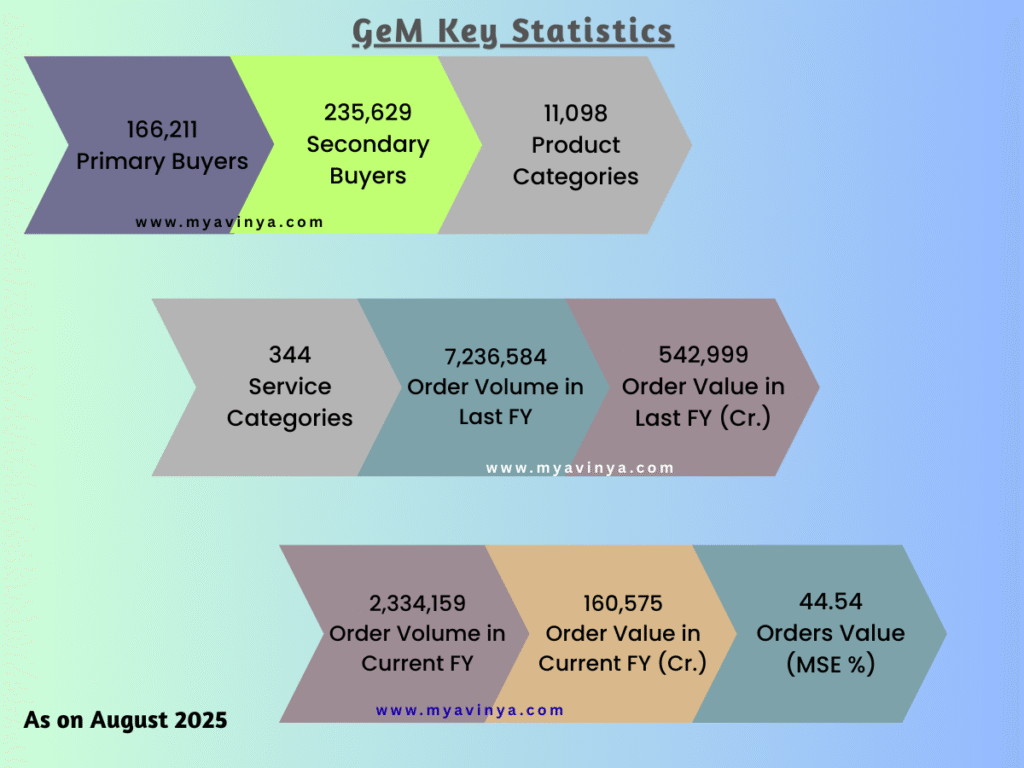
GeM Seller Dashboard in Numbers (July 2025)
- ₹3.77 lakh crore GMV achieved.
- 1.65 lakh buyers registered.
- 11,100 product categories and 340 service categories.
- Over 30 million orders placed since inception.
- 44% annual procurement reserved for MSEs (3% for women-owned, 4% for SC/ST).
How the GeM Seller Dashboard Works
Step 1: Seller Registration
- Sign up using Aadhaar/PAN, mobile number, and email.
- Complete your profile with PAN, Udyam number, bank details, and address.
- Pay caution money based on turnover.
Step 2: Catalogue Upload
- Add product or service listings with specifications, price, and certifications.
- Reviewed by GeM team before going live.
Step 3: Vendor Assessment (RITES)
- Optional but boosts credibility.
- “Vendor Assessed” sellers get higher ratings and visibility.
Step 4: Order & Payment Workflow
- Orders through Direct Purchase (<₹50,000), L1/RA bids, or custom BOQ bids.
- Fulfill orders, raise e-invoice, and track payment under Orders → Payments (PFMS).
“If you are new to GeM and want to explore tenders, you can also check our detailed guide on How to Search Tender on GeM.”
GeM Seller Order & PFMS Payment Flow
- Order received → Accept.
- Dispatch item or deliver service.
- Upload e-invoice and delivery proof.
- Buyer issues CRAC (Consignee Receipt & Acceptance Certificate).
- PFMS releases payment within defined timelines.
Caution Money Deposit
- Turnover < ₹1 Cr → ₹2,000
- ₹1–10 Cr → ₹10,000
- ₹10 Cr → ₹25,000
- Exemptions: SHGs, artisans, MSE women, SC/ST entrepreneurs, FPOs, ODOP.
Features of the GeM Seller Dashboard
- Seller-friendly interface to manage orders and invoices.
- Dynamic pricing: update based on market trends.
- Performance ratings for delivery and quality.
- Support & Disputes system for issue resolution.
- News & Events updates for sellers.
Business Opportunities for Sellers
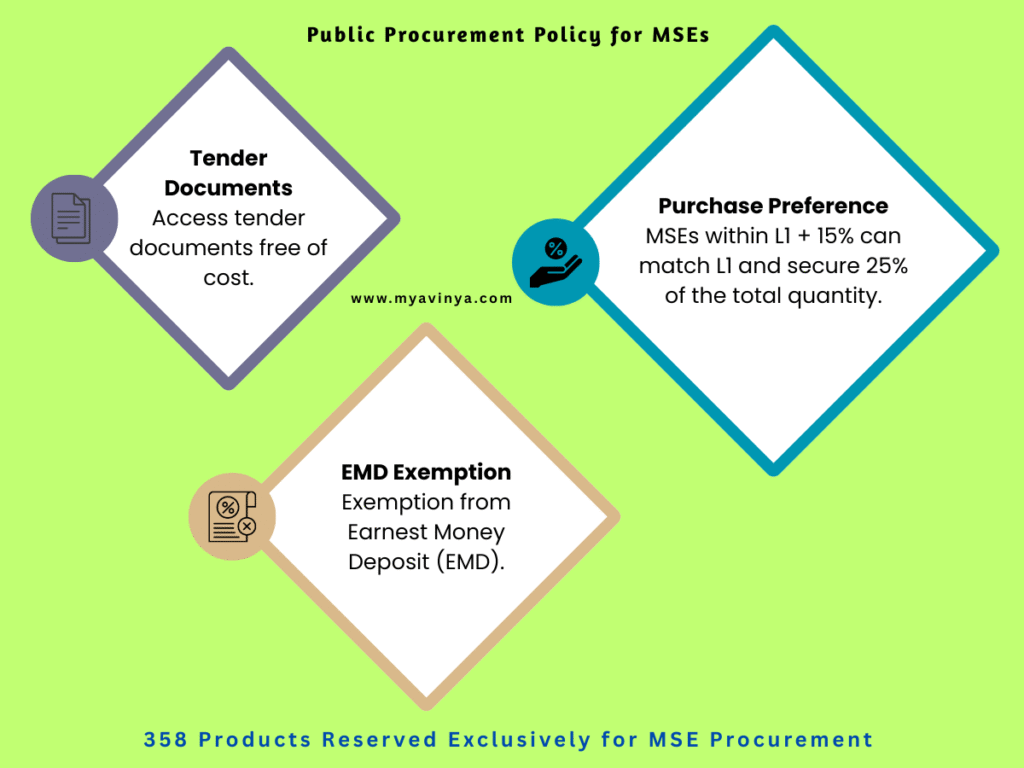
Public Procurement Policy for MSEs
- Free access to tender documents.
- EMD exemption.
- Purchase preference: MSEs within L1+15% can match and win 25% of orders.
- Mandatory procurement quotas for women and SC/ST-owned MSEs.
Startup Runway
- Exclusive marketplace for DPIIT-recognized startups.
- Exemptions from prior turnover and experience.
- Brand/IPR protection.
- 14 globally recognized innovation categories.
GeM Service Provider Dashboard
GeM offers 340+ services including HR outsourcing, IT support, AMC, consultancy, catering, healthcare, and more.
Service Workflow
- Create service listing with SLA, pricing, and coverage.
- Receive RFQ → Submit technical + price bid.
- Buyer issues Service Order with SoW.
- Deliver milestones → Obtain Completion Certificate.
- Upload invoice → Payment via PFMS.
Finance & Support Tools
GeM SAHAY Loan
Collateral-free, digital loans in under 10 minutes against GeM purchase orders.
GeMmy Chatbot & Helpdesk
- 24×7 AI chatbot for instant queries.
- Helpline numbers: 1800-102-3436 / 1800-419-3436.
- Walk-in support at Jeevan Tara Building, New Delhi.
Multilingual e-Learning
Training content available in 12 Indian languages.
Pro Tips to Succeed on GeM
- Get Vendor Assessed (RITES) for better ratings.
- Use the Business Opportunity tab to find demand.
- Upload proper proof documents to avoid PFMS delays.
- Respond quickly to buyer queries and orders.
- Maintain on-time delivery to boost seller ratings.
FAQs
What is the GeM Seller Dashboard?
The GeM Seller Dashboard Overview is the main interface for sellers to manage catalogue, bids, orders, invoices, and PFMS payments.
Is Vendor Assessment compulsory?
Not mandatory, but highly recommended for seller credibility.
How is caution money calculated?
Based on turnover, from ₹2,000 to ₹25,000. Some MSMEs are exempt.
How do startups benefit on GeM?
Through Startup Runway, which provides exemptions and special categories.
How do payments happen on GeM?
Payments are processed via the PFMS payment process after buyer acceptance.
Conclusion
The GeM Seller Dashboard Overview 2025 gives businesses a powerful way to sell to government buyers with transparency and speed. From catalogue uploads and bids to orders and PFMS payments, the dashboard is the complete ecosystem for sellers and service providers.
If you’re serious about growing with GeM, mastering this dashboard is your first step — and soon you can dive deeper with advanced modules and training.
Disclaimer
This blog post is intended for informational purposes only. While every effort has been made to ensure the accuracy of the content, readers are advised to verify details through the official Government e-Marketplace (GeM) website. We are not affiliated with GeM or the Government of India, and this guide does not constitute legal, financial, or professional advice.